 Viv Sharma
MD-102 is now broader than basic Intune administration. The current blueprint expects an endpoint administrator to understand device onboarding across platforms, Windows Autopilot and device preparation, Intune Suite capabilities, endpoint protection, Windows 365, Microsoft Graph automation, reporting and agent-assisted operations.
Exam snapshot
The exam supports the Microsoft 365 Certified: Endpoint Administrator Associate credential. Microsoft recommends hands-on experience with Intune, Microsoft Entra ID, Windows client management, non-Windows platforms and endpoint security. Treat the official practice assessment as a diagnostic tool, not a question bank.
Skills measured from 24 July 2026
| Domain | Weight | What to master |
|---|---|---|
| Prepare infrastructure for devices | 20–25% | Entra join and registration, dynamic device groups, platform enrollment, Apple Business Manager, Android enterprise enrollment, RBAC, scope tags, multi-admin approval, compliance, Conditional Access, Windows Hello for Business and Windows LAPS. |
| Manage and maintain devices | 25–30% | Autopilot and device preparation, Enrollment Status Page, Windows 11 upgrades, Windows 365 provisioning, device profiles, assignment filters, Intune Suite capabilities, Remote Help, Cloud PKI, Advanced Analytics and remote actions. |
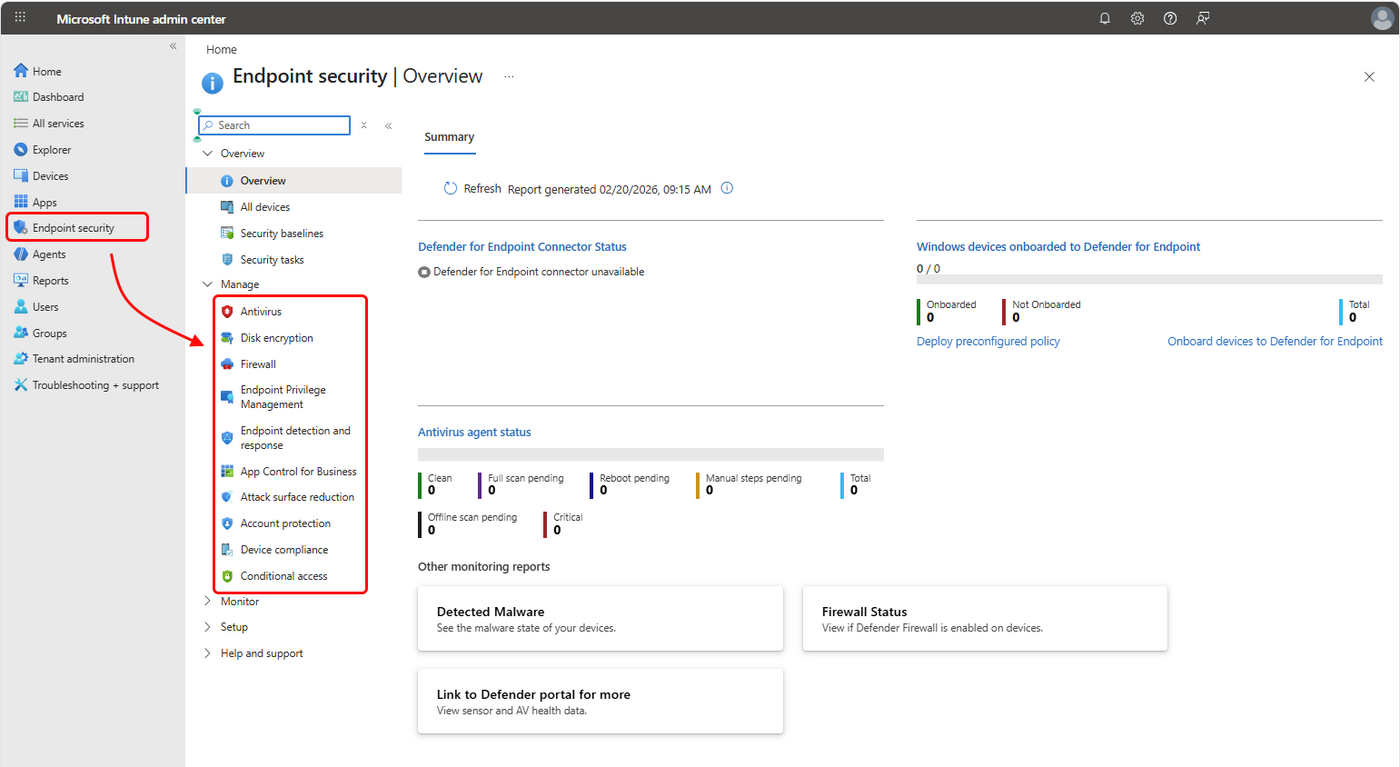
| Protect devices | 15–20% | Antivirus, BitLocker, firewall, attack surface reduction, security baselines, Defender for Endpoint integration, App Control for Business, update rings, feature and quality updates, Autopatch, Hotpatch and cross-platform updates. |
| Manage and secure applications | 15–20% | Win32 and line-of-business apps, Microsoft Store apps, Microsoft 365 Apps, platform stores, app configuration, app protection, mobile application management and Conditional Access integration. |
| Optimise endpoint operations | 10–15% | PowerShell and Microsoft Graph, Security Copilot agents, custom compliance, reporting, Endpoint Analytics, proactive remediations, reliability scores, service health and operational alerting. |
Build a representative lab
A lab should let you make a configuration, observe the device state and troubleshoot the result. A single Windows 11 virtual machine is useful, but the exam also expects platform and application-protection decisions that cannot be learned from Windows alone.
- Microsoft 365 developer or trial tenant with Intune and Entra permissions
- Windows 11 virtual machine with TPM support where possible
- Entra-joined and Intune-enrolled test device
- Android Enterprise or iOS/iPadOS test path, even if only documented rather than fully built
- Test users and device groups with deliberate assignment boundaries
- Microsoft Defender for Endpoint connector and onboarding policy
- Win32 test application with detection and requirement rules
- Compliance policy connected to a report-only Conditional Access policy
Five-week study plan
Compare registered, Entra-joined and hybrid-joined devices. Configure automatic Windows enrollment, restrictions, corporate identifiers, dynamic groups, role assignments, scope tags, compliance and a report-only Conditional Access policy. Map the major Apple and Android corporate enrollment flows.
Build an Autopilot profile and Enrollment Status Page. Compare Autopilot device preparation with classic Autopilot modes. Create Settings Catalog policies, import an ADMX file, use assignment filters and understand Group Policy analytics. Create a Windows 365 provisioning design.
Create separate antivirus, firewall, disk-encryption, EDR and attack-surface-reduction policies. Integrate Defender for Endpoint. Review security baselines and App Control for Business. Build update rings, feature-update and quality-update policies, then explain Autopatch and Hotpatch prerequisites.
Package a Win32 app, write detection rules, define dependencies and supersedence, and troubleshoot Intune Management Extension logs. Configure Microsoft 365 Apps, app configuration and app protection policies. Understand how Conditional Access requires an approved app or app protection policy.
Query Intune through Microsoft Graph, create a remediation package, use device query and Endpoint Analytics, review service health, and investigate reporting data. Complete timed practice assessments and revisit only weak domains.
Decision patterns to practise
| Requirement | Likely control | Common mistake |
|---|---|---|
| Provision a new corporate Windows device with minimal IT touch | Windows Autopilot or device preparation with Entra join and Intune enrollment | Using hybrid join without a genuine dependency |
| Protect corporate data on an unmanaged mobile device | App protection policy plus app-based Conditional Access | Requiring full device enrollment when MAM meets the requirement |
| Evaluate whether a device can access Microsoft 365 | Compliance policy plus Conditional Access | Expecting a configuration profile alone to gate access |
| Configure antivirus, firewall or BitLocker | Focused Endpoint security policy | Configuring the same setting in several policy types |
| Fix a recurring device issue | Remediations with detection and remediation scripts | Using a one-time script without recurring validation |
| Allow an approved application while restricting executable trust | App Control for Business base and supplemental policies | Moving directly to enforcement without audit evidence |
PowerShell and Microsoft Graph practice
You do not need to memorise every cmdlet. You should understand permissions, pagination, filters, object identifiers and the difference between a read operation and a remote action.
Connect-MgGraph -Scopes `
  "DeviceManagementManagedDevices.Read.All", `
  "DeviceManagementConfiguration.Read.All"

Get-MgDeviceManagementManagedDevice -All |
  Select-Object DeviceName, OperatingSystem, ComplianceState, LastSyncDateTime

# Direct Graph query for selected device properties
Invoke-MgGraphRequest -Method GET -Uri `
  "https://graph.microsoft.com/v1.0/deviceManagement/managedDevices?`$select=deviceName,operatingSystem,complianceState"
For remediations, write an idempotent detection script that exits 0 when compliant and 1 when remediation is required. Log enough evidence to support troubleshooting without exposing secrets or user data.
Final readiness checklist
- I checked the official objective version for my exam language and date.
- I can explain each join and enrollment method and its prerequisites.
- I can deploy, monitor and troubleshoot a Win32 application.
- I can distinguish configuration, compliance and Conditional Access responsibilities.
- I can design Autopilot, Windows 365, update and endpoint-security policies.
- I understand the new automation, reporting and Security Copilot agent objectives.
- I can identify the least-complex solution that meets the stated requirement.
Microsoft references
- Official MD-102 study guide
- Microsoft 365 Certified: Endpoint Administrator Associate
- MD-102T00-A course and learning paths
- Microsoft Intune documentation
- Microsoft certification practice assessments
Review note: Exam objectives, portal labels and cloud capabilities change. Recheck the official study guide during the week of your exam.