 Viv Sharma
Windows 365 provides a persistent personal Windows desktop as a cloud service. Microsoft manages the underlying compute platform while the organisation manages identity, licensing, provisioning policy, device configuration, applications, security and user support through Microsoft Intune and the wider Microsoft 365 control plane.
The service is strongest when the requirement is a predictable one-user-to-one-desktop experience and the organisation values operational simplicity more than low-level infrastructure control.
Where Cloud PCs fit
Contractors and partners
Provide a controlled corporate workspace without placing company data directly on an unmanaged personal device. Identity, Conditional Access and session controls still need careful design.
Merger and migration coexistence
Give selected users a target-tenant desktop while applications, identity and data move in stages. This can reduce local-device complexity but does not remove cross-tenant access planning.
High-risk or privileged roles
Separate administrative or sensitive work from the daily endpoint. Use a dedicated identity and strong controls; do not assume the Cloud PC is automatically a privileged access workstation.
Rapid workforce expansion
Provision a standard Windows environment without waiting for physical-device logistics, subject to licence, regional capacity, application and network readiness.
BYOD access
Keep managed applications and data inside a corporate Cloud PC while users connect from supported personal devices. Apply web, clipboard, drive and device-redirection controls according to risk.
Consistent specialist workspace
Provide a persistent desktop for applications that need a known configuration but do not require multi-session density or specialised Azure infrastructure.
Windows 365 or Azure Virtual Desktop?
| Decision factor | Windows 365 | Azure Virtual Desktop |
|---|---|---|
| Desktop relationship | Persistent personal Cloud PC | Pooled multi-session or personal host pools |
| Commercial model | Predictable per-user licence based on Cloud PC specification | Azure consumption plus relevant user licensing |
| Infrastructure control | Microsoft manages the Cloud PC infrastructure | Customer designs and manages host pools, images, scaling and Azure resources |
| Operational complexity | Lower for standard personal-desktop scenarios | Higher, with more flexibility and optimisation options |
| Multi-session | Not the standard Enterprise model | Core pooled-host capability |
| Best fit | Personal desktops with simple, predictable operations | Shared capacity, RemoteApp, specialised networking or granular Azure design |
Choose the network model
Microsoft now recommends the Microsoft-hosted network for most deployments. It supports Microsoft Entra join and removes the need to operate an Azure virtual network for the Cloud PCs. Use an Azure Network Connection only when a genuine requirement—such as hybrid join, direct private connectivity, customer-controlled routing or fixed egress—cannot be met through a modern hosted-network pattern.
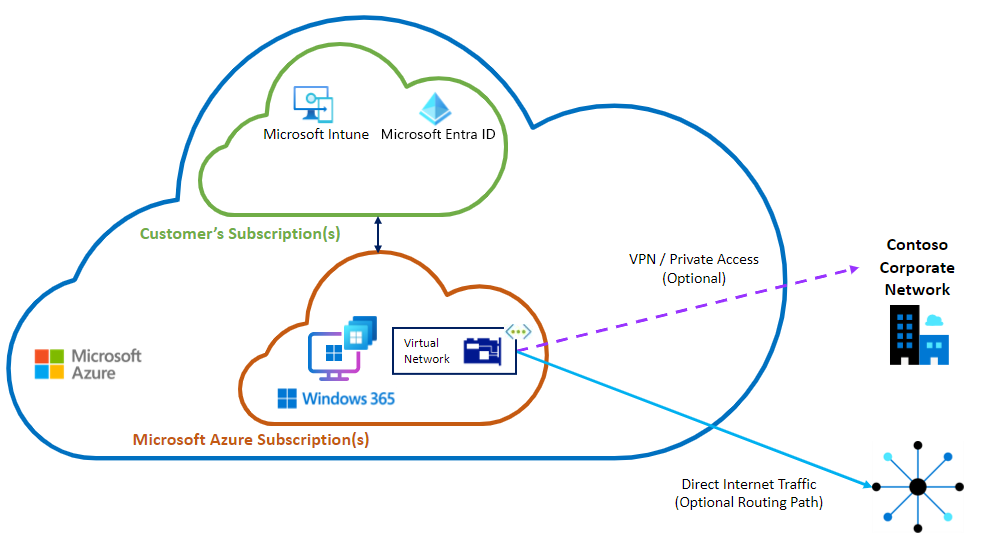
| Requirement | Microsoft-hosted network | Azure Network Connection |
|---|---|---|
| Entra join | Yes | Yes |
| Hybrid join | No | Yes |
| Customer-managed VNet | No | Yes |
| Direct line of sight to on-premises resources | Use VPN, secure web gateway or private-access client | Can use site-to-site VPN or ExpressRoute through the customer VNet |
| Operational overhead | Lower | Higher: routing, DNS, security, capacity and Azure operations remain customer responsibilities |
Prepare the service before assigning licences
- Define personas and specifications. Use application demand, concurrency, memory, storage and user experience—not job title alone—to select Cloud PC sizes.
- Confirm identity and administration. Use Entra groups, least-privileged Intune and Windows 365 roles, scope tags and privileged activation where appropriate.
- Select the network model and region. Prefer Microsoft-hosted network unless a documented dependency requires ANC. Validate data location, latency and service availability.
- Choose the image approach. Start with a gallery image when possible. Use a custom image only when configuration and app delivery cannot meet the requirement cleanly.
- Create provisioning policies. Separate policies by network, image, region and join model. Assign only to controlled pilot groups.
- Deploy policy and applications. Reuse the Windows 11 Intune baseline where suitable, but validate virtual-device settings, update behaviour, security clients and remote-session experience.
- Protect user data. Configure OneDrive Known Folder Move and appropriate retention or backup controls. Reprovisioning replaces the Cloud PC; it is not a data-recovery strategy.
Enterprise security baseline
- Require phishing-resistant authentication for high-risk personas where practical.
- Apply Conditional Access based on user, risk, client platform and session context.
- Enroll Cloud PCs in Intune and onboard them to Microsoft Defender for Endpoint.
- Apply BitLocker, antivirus, firewall, attack-surface-reduction and App Control requirements.
- Remove permanent local administrator access; use Endpoint Privilege Management or controlled support processes.
- Deploy secure web gateway, private-access or VPN clients with validated split-tunnel exclusions.
- Control clipboard, drive, printer, USB and other redirection according to the use case.
- Monitor sign-ins, Cloud PC health, device compliance and Defender risk together.
A Cloud PC is a managed Windows endpoint, not a trusted network location. Apply the same Zero Trust logic used for physical endpoints: verify identity, assess device posture, limit access, protect data and monitor continuously.
Build the operational model
| Event | Required process | Evidence |
|---|---|---|
| Provisioning failure | Check licence, group membership, policy assignment, region, image and network health | Provisioning status and audit records |
| Poor user experience | Separate endpoint, local network, service path, Cloud PC resource and application causes | Resource performance, connection quality and Endpoint Analytics |
| Resize request | Confirm supported resize path, licence availability, user impact and rollback | Approved persona/specification record |
| Reprovision | Confirm user-data protection and application recovery before replacement | Reprovision record and post-build validation |
| Leaver or licence removal | Coordinate access removal, data retention, grace periods and licence reclamation | Identity, device and service-management records |
| Service degradation | Check Microsoft service health, network dependencies and security-client health before broad remediation | Incident timeline and communications |
A controlled pilot
Week 1 — Foundation
Approve use cases, personas, architecture, licensing, security baseline, support ownership and success measures.
Week 2 — Technical build
Create groups and provisioning policies, deploy the image, apps, Intune policies, Defender and connectivity controls.
Week 3 — Friendly users
Validate provisioning, first sign-in, application performance, Microsoft 365 experience, peripherals, Teams media, security and support processes.
Week 4 — Operational proof
Test reprovision, restore of user data, resize, licence removal, incident triage, service communications and reporting.
- Provisioning success meets the agreed target.
- Sign-in and application performance are acceptable from representative locations.
- Security controls apply without conflicting with the virtual desktop experience.
- Support teams can distinguish local-device, connection, Cloud PC and application faults.
- Cost and licence utilisation match the approved persona model.
- Reprovisioning and user-data recovery are proven before production scale.
Microsoft references
- What is Windows 365?
- Windows 365 network deployment options
- Windows 365 architecture
- Create provisioning policies
- Windows 365 Enterprise requirements
Review note: Windows 365 licensing, regions, networking and service capabilities change. Validate the current Microsoft documentation before production design.