 Viv Sharma
A Microsoft 365 multitenant organisation defines a trusted organisational boundary around multiple Microsoft Entra tenants that belong to the same organisation. It is especially useful during mergers, acquisitions, divestitures and long-running tenant consolidation. The collaboration experience is built from several capabilities working together, not from the MTO object alone.
Understand the model
| Capability | Purpose | What it does not do |
|---|---|---|
| Multitenant organisation | Defines the participating tenant group and enables differentiated Microsoft 365 experiences. | It does not merge directories, workloads or policies. |
| Cross-tenant access settings | Govern B2B collaboration, B2B direct connect and trust of MFA/device claims. | Trust is not automatic merely because tenants are in an MTO. |
| Cross-tenant synchronisation | Creates, updates and removes B2B collaboration identities in resource tenants. | It does not move the source user or mailbox. |
| B2B member provisioning | Improves Microsoft 365 and Teams experiences for internal cross-tenant users. | The user still has a home identity and a resource-tenant identity. |
| Exchange organisation relationships | Provide calendar free/busy between tenants. | They do not migrate calendar data or mailbox permissions. |
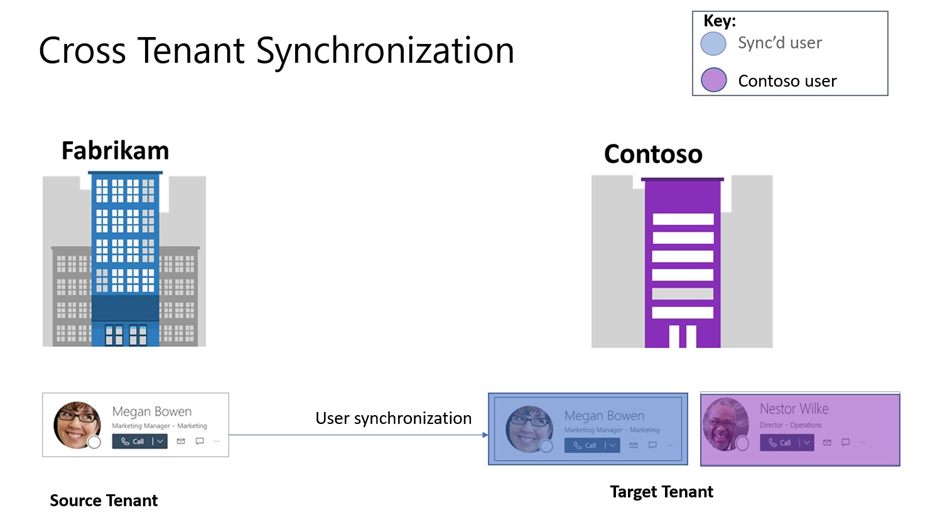
Where MTO delivers value
Merger coexistence
Let employees discover and collaborate with colleagues while identity, mailbox, Teams and SharePoint migrations continue in controlled waves.
Shared services
Provision selected users into a resource tenant for enterprise applications, support functions or shared collaboration spaces.
Staged tenant migration
Maintain people search, chat, meetings and controlled resource access while source and target users coexist.
Regulatory separation
Preserve distinct tenants for data residency or administrative boundaries while improving internal collaboration.
Useful Microsoft 365 experiences
- Cross-tenant people search and people cards in supported Microsoft 365 applications.
- Teams search, chat, calls, meeting scheduling and centralised notifications for provisioned MTO members.
- Calendar free/busy through reciprocal Exchange Online organisation relationships.
- SharePoint and OneDrive sharing to a lifecycle-managed B2B identity.
- Tenant labels in Teams to help distinguish users from different member tenants.

A controlled setup sequence
- Define the business collaboration scope, tenant owners, data boundaries and exit criteria.
- Create or join the MTO from each participating tenant and record the reciprocal relationship.
- Configure cross-tenant access settings for B2B collaboration and, where required, B2B direct connect.
- Decide whether to trust inbound MFA, compliant device and hybrid-joined claims from each partner tenant.
- Create cross-tenant synchronisation with a limited pilot group and map the required attributes.
- Provision users as B2B members where the improved MTO experience requires it, and confirm
showInAddressList. - Enable reciprocal Teams collaboration and Exchange free/busy only after the underlying security design is approved.
- Test joiner, mover, leaver, rehire and source-object deletion behaviour before production scale.
Provisioning verification
Connect-MgGraph -Scopes "User.Read.All","Policy.Read.All"

# Inspect a synchronised identity in the resource tenant
Get-MgUser -UserId "user@resource.example" `
  -Property Id,DisplayName,UserPrincipalName,UserType,ShowInAddressList,
            ExternalUserState,OnPremisesSyncEnabled

# Review cross-tenant access policy partners
Get-MgPolicyCrossTenantAccessPolicyPartner
MTO is not a Conditional Access bypass
The resource tenant still evaluates access to its applications and data. A compliant device in the home tenant does not automatically satisfy a resource-tenant “require compliant device” policy. The resource tenant must be configured to trust the relevant inbound device claim, and the sign-in must carry a claim that the policy can use.
Use trust selectively. Accepting MFA or device claims from another tenant means relying on that tenant’s identity, device and policy operations. Define minimum standards, evidence, incident contacts, change notification and periodic review for every trusted tenant.
Field experience from migration programmes
In large tenant migrations, the identity can be provisioned successfully while the user experience remains inconsistent across workloads. The most reliable approach is to test each collaboration journey with a source user, a resource-tenant user, a compliant corporate device, a browser session and the exact Conditional Access policies that will apply.
Patterns that matter
- Standard Teams and team sites: B2B member identities created by cross-tenant sync are suitable for membership and staged permission replay.
- Shared channels: use Teams shared-channel architecture and B2B direct connect where appropriate; do not assume the same membership replay method as standard channels.
- Meeting joins: users may need to select the B2B member identity on the pre-join screen to retain chat, recording and transcript access in the host tenant.
- Address discovery: attribute mapping,
UserTypeandshowInAddressListdetermine whether a provisioned identity behaves as expected. - Lifecycle: scope changes and deprovisioning must be tested before using MTO identities for long-lived permissions.
- Permissions replay: map immutable object identifiers and record failures; UPN string matching alone is fragile during domain transition.
Known boundaries and caveats
- A tenant can create or join only one MTO, and the current limit is 100 active tenants.
- People cards may expose only limited profile information unless the relevant attributes are synchronised.
- Meeting artefacts remain associated with the identity used in the host tenant.
- Cross-tenant Teams Rooms or conference-room booking is not a complete MTO experience.
- Groups and group membership are not automatically synchronised merely because users are selected through a group.
- Existing B2B member objects can immediately be recognised as MTO members when the organisation is created.
- MTO improves coexistence; it does not replace the target-state migration and decommissioning plan.